


 |  |  |  |
Feature set summary for Blackberry Z10 review
The two snappers – an 8-megapixel model and a front-facer work well, and the display has a good resolution. If you like your apps, they’re a bit thin on the ground as yet.
Style and handling summary for Blackberry Z10 review
This is a business handset, make no mistake about it – with its soft rubber reverse and all black chassis. It’s chunky too and there’s a wide bezel around the 4.2in display. The back comes off a tad too easily though.
Battery power summary for Blackberry Z10 review
A bit disappointing – dies after a day in normal use and only gives four and a half hours of video streaming.
Performance summary for Blackberry Z10 review
There’s a dual-core chip on board that manages Blackberry 10 well, along with apps and (the admittedly slim selection of) games. It slowed down a little when browsing the web.
User friendliness summary for Blackberry Z10 review
Navigation is made using swipes, which can take some getting used to. Slow typists will like the predictive keyboard.
>

Blackberry Z10 Review Scoring Summary
| Style & Handling |  |
| User Friendliness |  |
| Feature Set |  |
| Performance |  |
| Battery Power | |
| Overall Score |  Pros : Sharp 4.2in display; 8MP snapper performs well in daylight; Hub offers lots of customisation; decent virtual keyboard Cons : Design is uninspiring; limited choice of apps; No killer features; disappointing battery life Verdict: The BlackBerry Z10 is a decent phone for leisure and business with a smart operating system, great virtual keyboard and sharp display. The uninspiring design, limited choice of apps and lack of killer features let it down. |
Full Review and Specification for the Blackberry Z10
It’s taken a year, but finally BlackBerry has come into 2013 with a new operating system (BlackBerry 10) and a new phone – the Blackberry Z10. It’s the first official BB10 phone, so does it live up to expectations?
Looks the business
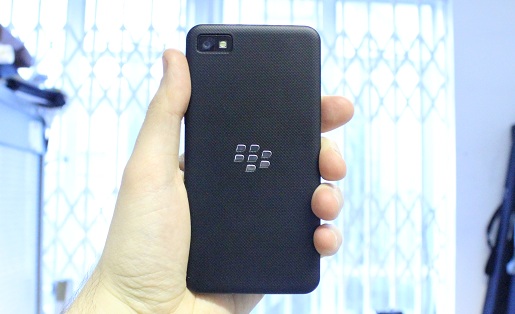
It feels good to hold, with a decent heft – it weighs 130g so is a good enough weight to sit well in the palm. Plus there’s a soft-touch reverse to help grip.
The power buttons sits in the centre, which seems a bit strange at first, but actually it means it is good for both right and left-handers. Flick up the screen and this will wake up the handset too. The volume controls can be found on the right edge, while between them sits a button for firing up BlackBerry’s version of Galaxy Voice and Siri – called Voice Control.
The Z10 is of the typical BlackBerry design, with no fancy stuff – very businesslike in its all-black chassis. The plastic frame runs around the edge and the back has a rubbery feel. The display measures 4.2 inches and sits right in the centre of the handset. There are wide bezels around it.
The handset is more chunky and longer than the Apple iPhone 5 – it’s more in line with the LG Nexus 4 sizewise. In fact it’s not much different in size to the Samsung Galaxy S III although it is thicker, measuring 9mm.
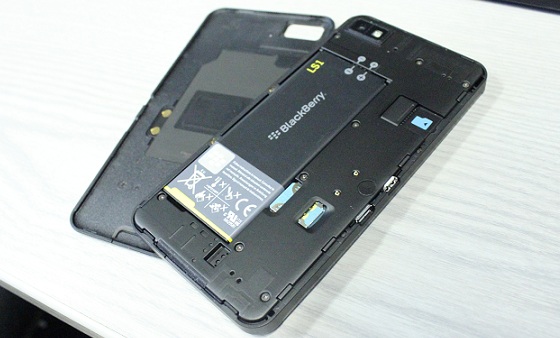
The back of the phone can be prised off easily to gain access to the SIM card and microSD memory card slots and battery. The back plate doesn’t feel that secure though, and doesn’t seem to sit quite right – we suspect if you dropped the handset the back would come flying off. In fact it even popped off when we had the handset in our pocket.
New operating system
Anyone who’s used to Android or iOS will find the swipes required for Blackberry 10 a little strange at first. For instance, instead of pressing a button, you swipe up from the bottom of the screen to get to the home screen. We got used to it after a while – although you need to carry out quite a long swipe to get out of the lock screen, and sometimes it took a couple of attempts.
Setup is quite simple – you can sign into your BlackBerry ID or create one if you don’t have it already. Then set up accounts such as LinkedIn, Facebook, Twitter and so on. It took us a couple of goes to get Google calendar to register but we put this down to it being the first day.
Go to the home screen and you’ll see that in actual fact it is a grid of the eight last-used apps, which you can scroll down. Pretty handy if you use two or three a lot. Swipe left to see all your app icons – these can be arranged as you wish.
Swipe right and you end up at BlackBerry hub, the core of the OS, where you can see all of your notifications at the same time – so Facebook, emails, calendar and so on.
Other neat features include Story Maker and BBM. Mind you we were hoping to see something really different that would make the BlackBerry OS stand out from the competition. Instead most of the offerings are variations on tools found in iOS and Android.
The hub lets you type a quick tweet or email – but if you want to go into account profiles or see what your contacts are up to you’ll need to go into the specific Facebook, Twitter or whatever accounts. That said, we still like the way the Hub is presented, and it is possible to switch on or off accounts as you wish. Swipe up and along from any app to easily see incoming alerts. Although this didn’t work so well when we were in Touch Typist.
The keyboard is full of features. It’s well laid out and has the usual massive range of smileys. Start to type and you’ll see words pop up above some of the keys. Type ‘hap’, for instance and ‘happy’ will appear above the ‘p’ key. Flick up from the key to input the whole word. Slower typists will find this useful.
If you tire of typing you can always use voice commands. The Voice Command facility is like Siri, as it lets you fire up apps and get to features - simply hold down the Voice button and speak to your handset! It did a decent job of understanding commands (even with an accent). But you have to be very specific – ‘open camera’ works, but ‘open the camera’ doesn’t, for example.
Smooth operator
The new operating system runs smoothly on the Z10 – we popped in and out of menus easily, and surfing the net was especially speedy. Pages loaded almost instantly thanks to the 4G connection or a good Wi-Fi signal. We did experience a little bit of slowdown when scrolling through sites.
Are we appy?
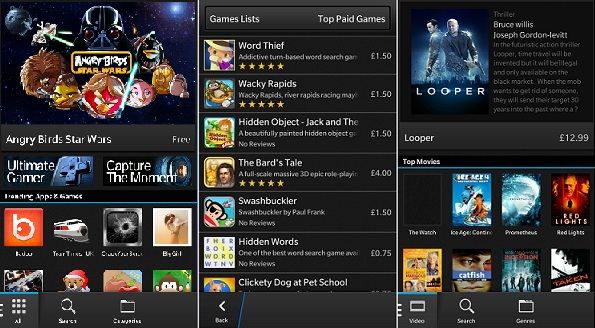
There are now 70,000 apps on BlackBerry World, with 1,000 more added every week, but compared with Google Play and iTunes choice seems limited. Many games titles are unknown or old and cost between £2 and £5. Social media apps are well represented but categories such as books and sports are sparse.
You can download films and music but choice is also limited. For instance, look for Avengers and the old Uma Thurman film pops up, but no Avengers Assemble. There’s a nice choice of older titles though.
Once BlackBerry World is up to speed, we hope it will be able to compete with Google and Apple – but at the moment if you’re an app fan, it’s not going to impress you.
Battery life is a tad disappointing. The battery will die after 24 hours if you have Wi-Fi turned on, and the brightness up on your screen. Video streaming sees it run out of juice after only four and a half hours – we expect at least five from smartphones these days.
Getting snappy
The eight megapixel snapper does a good job in daylight. Tap the screen or hit the volume key to take a shot. Auto focus works well too, and is speedy enough for you to catch those impromptu pictures. In lower light we needed the flash to capture the shot.
Time Shift lets you take two seconds of video and then choose a still image. You can rewind so that the face is separate from the rest of the shot – nice if you want to avoid those gurning or eyes shut shots. You need to hold the handset steady – and your subject needs to stay still too for this to work properly
There’s a nice choice of editing tools – including crop, contrast, brightness and rotate. You can also share the final image by social media, BBM, email – even NFC. This flexibility is great for anyone who uploads lots of photos of family and friends. Plus there’s a front-facing lens for video calls – and you can grab full HD video.
On display
The display is a great media screen, which is unusual for a business handset. The resolution of 1280x768 results in 365 ppi – that’s sharper than the iPhone 5’s Retina display. You’ll notice the difference when streaming HD video. The screen is pretty bright – not quite on a par with the Samsung Galaxy S III or iPhone 5, but still enough to cope with most glare. Viewing angles also impress – picture quality doesn’t disappear when you tilt the screen away from you.
Our conclusion
There’s plenty to like on the BlackBerry Z10 – the sharp 4.2in screen, the decent snapper – but it doesn’t really wow the user. Once more features and apps are available, the BB10 operating system will be one to look out for, but at the moment, the uninspiring phone design and limited choice of apps make it hard to really recommend.
Blackberry Z10 Specification
GENERAL
| Type of device | Smartphone |
| Operating System | BlackBerry 10 OS |
| Dimensions | 130x65.6x9mm |
| Weight | 137.5grams |
| Form factor | Touchscreen |
| Input | Touch Screen |
| Processor speed | 1.5GHz dual-core |
| CPU | Dual-core |
| Graphic chipset | |
| Announced | January 2013 |
| Status | Available |
DISPLAY
| Screen size | 4.2-inches |
| Screen type | LCD |
| Resolution | 1280 x 768 |
| Display type | WXGA |
Memory
| RAM | 2GB |
| Internal storage | 16GB |
| Memory card slot | Yes |
Camera
| Camera | 8 megapixels |
| Secondary camera | 2 megapixels |
| Special camera features | Back Side Illumination for better low-light performance 5-element F2.2 lens Dedicated ISP (image signal processor) with 64MB frame buffer Flash, continuous and touch to focus, image stabilization Enhanced Super Resolution Digital Zoom (5x) 1080p HD video recording 4 DOF (Degrees of freedom) video stabilization Time Shift mode for pinpointing and adjusting individual elements of your picture |
Sound
| 3.5mm Jack | Yes |
| Music player | BlackBerry Music |
| Audio recording | Yes |
| Radio | No |
| FM Radio description |
Video
| Video recording | Yes |
| Video player | 3GP, 3GP2, M4A, M4V, MOV, MP4, MKV, MPEG-4, AVI, ASF, WMV, WMA, MP3, MKA, AAC, AMR, F4V, WAV, MP2PS, MP2TS, AWB, OGG, FLAC |
| Video calling | Yes |
| Video streaming | Yes |
Additional Features
| Browser | BlackBerry Browser |
| Games | Downlaod via BlackBerry World |
| Voice control | Yes |
| Voice dialling | Yes |
| Other | Micro HDMI for connection to your HDTV or projector |
Messaging
| SMS | Yes |
| MMS | Yes |
| Yes | |
| IM | Yes |
Connectivity
| Wi-Fi | Yes |
| Bluetooth | Yes |
| USB | Yes |
| NFC | Yes |
| GPS | Assisted, Autonomous and Simultaneous GPS Preloaded with BlackBerry Maps application |
Network
| Band | N/A |
| EDGE | No |
| GPRS | No |
| HSDPA | No |
| 4G/LTE |
Other
| Colours (Standard) | Black and White |
| Handsfree speaker phone | Yes |
| Customisable ringtones | Yes |
| What's in the box | Quick, Manual, Headphones, Case and USB Cable. |
| Website | http://uk.blackberry.com/ |
Battery
| Standby | 13 Days |
| Talktime | 10 hours (3G) |
| Battery life multimedia | N/A |
Tidak Ada Komentar Pada Artikel » BlackBerry Z10 Review
Post a Comment